
Products · Edge device
Live monitoring on the cameras you already own.
The edge device is a small computer that runs our analytics on site and sends video out to our operators. No port forwarding, no new cameras, no IT project.
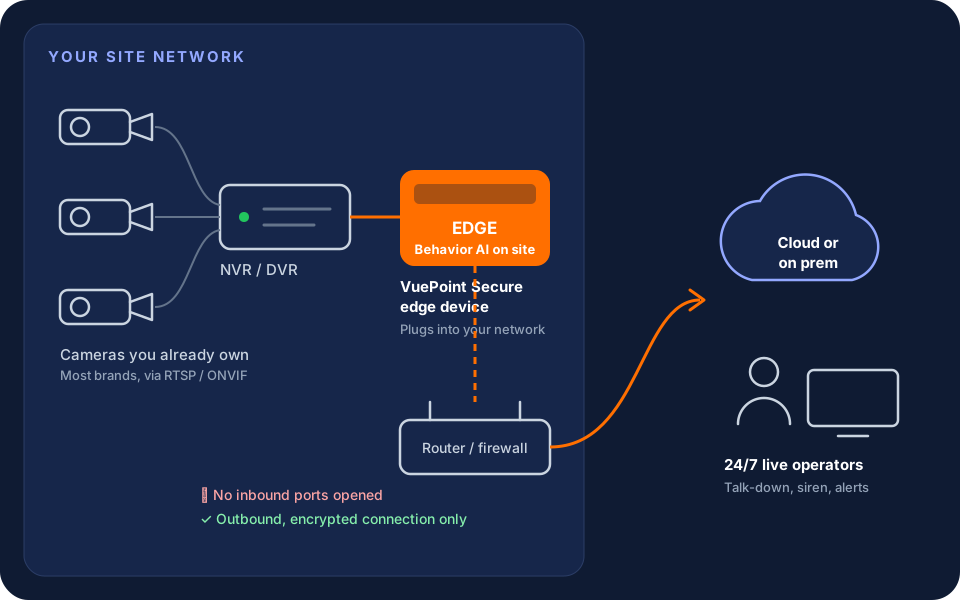
How it connects
It connects out. Nothing connects in.
The edge device plugs into your network next to the recorder. It reads the camera streams locally, runs Behavior AI on them, and sends events and video out to VuePoint over an encrypted connection it opens itself.
Because the connection starts from inside your network, nobody opens a port on the router and no outside party gets a way in.
- Reads cameras and recorders over RTSP / ONVIF, whatever the brand
- Outbound-only, encrypted connection
- Cameras and recorder stay yours
The edge device
What it does.
Analytics on site
Behavior AI runs on the device, next to the cameras. Only events worth a look go to an operator.
No port forwarding
No router changes, no exposed recorder, no static IP. The device connects out on its own.
No IT project
One network cable and power. Your IT team doesn't have to open anything or manage it.
Cloud or on prem
Runs with our cloud, or keeps processing on your premises where policy requires it.
Keep your cameras
Works with the cameras and recorder already on the building, so you add the people watching them instead of replacing hardware.
Live operators
Flagged events go to a 24/7 operator who can talk down, trigger a siren where installed, and alert your team.
Install
Getting set up.
- 1
Plug it in
Connect the device to your network next to the recorder and give it power.
- 2
We find the cameras
We connect it to your cameras or recorder and confirm every view.
- 3
We set the rules
Zones, schedules and who to call, set per camera with you.
- 4
Monitoring goes live
Operators start watching. You get alerts with what they saw.
Why not just forward a port?
Edge device vs port forwarding.
Router changes
Edge device
None
Port forwarding
Open ports on the router
Recorder exposed to the internet
Edge device
No
Port forwarding
Yes, the login page is reachable
Static IP or DDNS
Edge device
Not needed
Port forwarding
Usually needed
IT involvement
Edge device
Plug in network and power
Port forwarding
Router access and firewall rules
AI analytics
Edge device
Runs on the device
Port forwarding
Not included
FAQ
Edge device questions
Does the edge device work with my camera brand?
It connects to most cameras and recorders that provide standard RTSP or ONVIF video streams, which covers the major brands. Send us the make and model and we'll confirm before install.
Do I need to port forward or change my router?
No. The edge device opens an encrypted connection out to VuePoint from inside your network. Nothing is forwarded and no inbound ports are opened.
Does my IT team need to be involved?
Usually not. The device needs one network connection and power. If your network blocks outbound traffic, we'll give your IT team the details they need.
Can the analytics run on premises?
Yes. The device runs analytics on site, and it can work with our cloud or keep processing on your premises where policy requires it.
Put live monitoring on the cameras you have.
Tell us the address and what's installed. We'll confirm compatibility and pricing.